Multi charging point management
When several electric cars charge at the same time, they can quickly ask for more power than your grid connection can deliver. Multi charging point management shares the available power sensibly between all charging stations. You decide yourself which car comes first.
The essentials
- Multi charging point management combines several charging stations or charging points into one group.
- Your SOLIO shares the available power between all cars that are currently charging.
- When power is short, the charging points higher up in the Prioritization get power first.
- You change the order yourself by drag and drop.
- Suitable for apartment buildings, companies with a fleet and charging parks, for example with the Alpitronic Hypercharger.
Your installer decides which charging stations belong to the group and how much power is available in total. They know the limits of your grid connection. In the App Center the function is called Multi-charging point management; for charging stations with the new controls it is called Chargepoint Cluster.
How it works
Your SOLIO constantly checks how much power is available for charging and shares it between the cars that are plugged in. Depending on the setup, it respects different limits:
| Goal | What your SOLIO does |
|---|---|
| Protect the grid connection | Together, the charging stations only get as much power as keeps the purchase at the grid connection below a set limit. Other consumers in the building are taken into account. |
| Avoid peak loads | Your SOLIO takes the grid purchase per phase and the power of your battery into account so that no load peaks occur. |
| Use solar power | The cars charge with the surplus from your photovoltaic system. |
If there is not enough power for everyone, the Prioritization usually decides: charging points higher up are served first, those further down get what is left.
If your group is set up with a fixed limit at the grid connection, your SOLIO instead shares the power fairly: small requests, for example from AC charging stations, are served in full, and the rest is split equally between the large requests, such as the rapid charging points of a Hypercharger.
What it looks like
In the cockpit you see each charging station on its own: in the energy flow and on the Consumption page. The overview of the whole group and the order are found in the previous view on the Live page. How to switch views is explained under Switch on the new design.
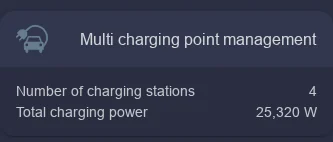
- Number of charging stations: How many charging stations or charging points belong to the group.
- Total charging power: How much power all cars together are charging with right now.
A click on the tile opens the detailed view. The chart shows how the charging power is currently shared between the individual charging stations. Below it you find the Prioritization.
Setting the order
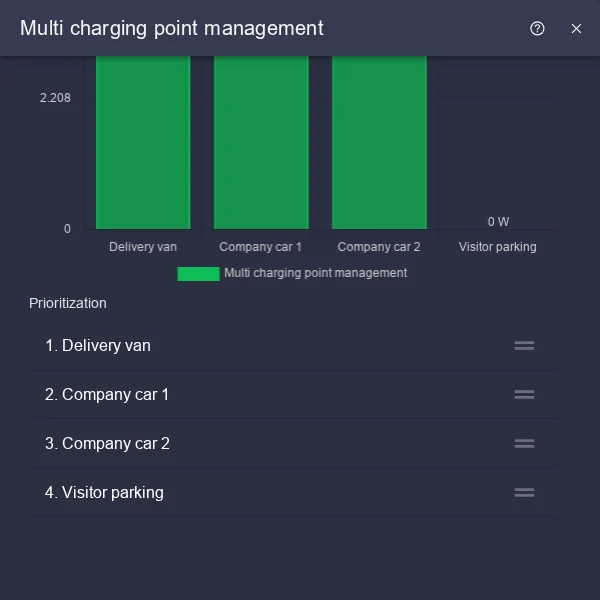
In the previous view, click the tile of your charging station group on the Live page. Scroll down to the Prioritization list.
In the Prioritization list, grab a charging station by the handle on the right (≡) and drag it to the position you want. The charging station with the highest priority is at the very top.
Click the round button with the tick that appears at the bottom. Only then does the new order apply.
| Position | When power is short | When more power becomes available |
|---|---|---|
| Top | is reduced last | gets more power first |
| Bottom | is reduced first | gets more power last |
Put the charging points at the top whose cars need to leave again soon, for example company cars with fixed departure times. Cars that stay parked for a long time go to the bottom.
Operating individual charging stations
Each charging station in the group still has its own page. There you choose the charging mode, the energy limit or the schedule as usual. The Charging station page explains how. Multi charging point management only makes sure that all of them together stay within the limits.
Frequently asked questions
A car is charging more slowly than expected. Why? Power is probably short at the moment, for example because several cars are charging at the same time or other consumers in the building need a lot of electricity. The charging points higher up in the prioritization then get power first. The car itself also limits the power, for example when its battery is nearly full.
A car is not charging at all. What can I do? Check the State and the charging mode on the charging station's page. If the charging station is at the very bottom of the prioritization and no power is left, it waits until power becomes available again. Move it further up if necessary.
Can I change the total power myself? No, this limit depends on your grid connection and is set by your installer. Talk to them if anything changes about your connection or your consumers.