Charging station
Your SOLIO controls your charging station (wallbox) so that your electric car charges with electricity from your own photovoltaic system wherever possible. When you are in a hurry, it charges at full power. You decide with a few clicks in the portal or the app.
The essentials
- The charging mode decides how your car charges: with solar power only, with a guaranteed minimum power or as fast as possible.
- The energy limit ends a charging session automatically once a set amount of electricity has been charged.
- In the schedule you decide when which charging mode applies, for example fast charging every morning before work.
- You see charging power and charged energy live in the cockpit and afterwards in the history.
- If you have several charging stations, multi charging point management shares the power between them.
Your installer connects the charging station to the SOLIO and sets up the matching app. After that you operate everything yourself.
Where to find your charging station
Your charging station appears in the menu under Cockpit → Consumption with its name, for example "KEBA P40". In the energy flow it shows up as a small circle next to consumption, and under Consumption its current charging power is listed in the details.
Use the heart icon at the top of the page to add the charging station to your Favorites. It is then just one click away in the menu.
What it looks like
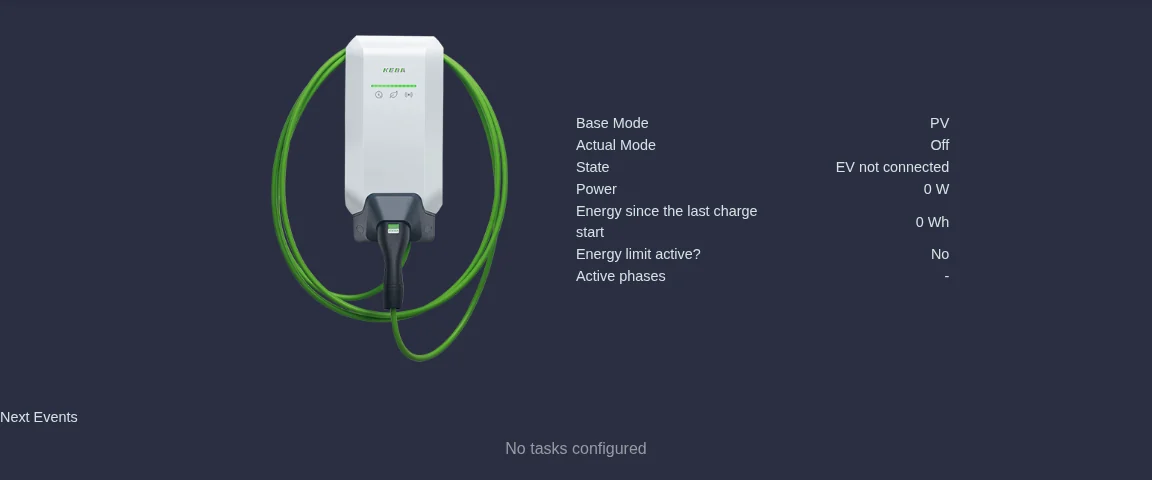
The start page of your charging station shows at a glance what is happening right now.
| Display | Meaning |
|---|---|
| Base Mode | The charging mode you have set: PV, Minimal, Fast or Off. |
| Actual Mode | What the charging station is actually doing at this moment. If the car is not charging, it shows Off. If the schedule currently calls for a different mode, you see it here. |
| State | For example EV not connected, EV connected, Charging, Charging paused or Charging finished by energy limit. |
| Power | How much power the car is charging with right now. |
| Energy since the last charge start | How much electricity has been charged in the current session. |
| Energy limit active? | Yes if an energy limit is switched on. |
| Active phases | Whether the car is currently charging on one or three phases. |
When an automatic phase switch is coming up, the line Phase switch in shows a countdown. Under Next Events you see what the schedule has planned next.
All other pages are in the menu under the name of your charging station:
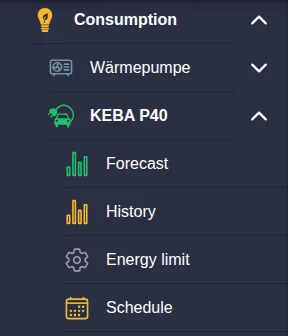
As soon as you change a setting, a round button with a tick appears at the bottom. Your change only takes effect once you click it.
Choosing the charging mode
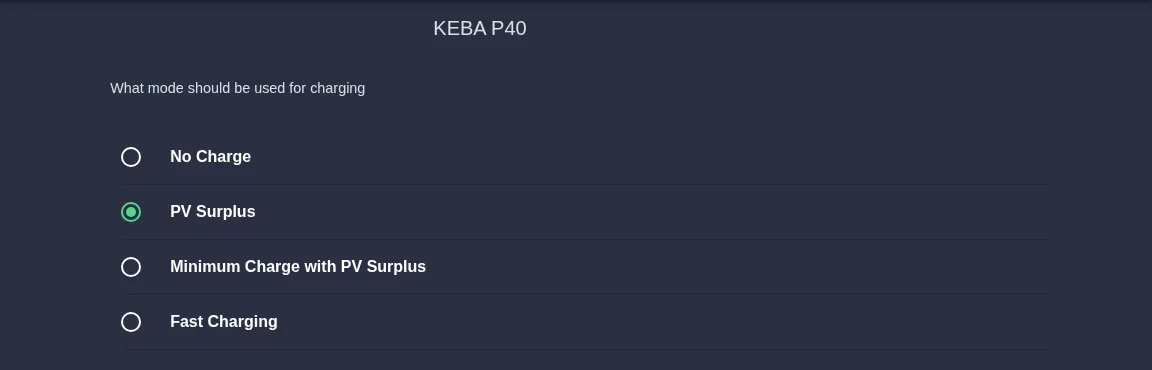
The charging mode is the most important setting. Open it via Charging mode in the menu.
| Charging mode | What happens | A good choice if … |
|---|---|---|
| No Charge | The car is not charged. | … you do not want to charge at the moment. |
| PV Surplus | The car only charges with the electricity your PV system has left over. If the surplus is not enough, charging pauses. | … the car has time and you only want to use solar power. |
| Minimum Charge with PV Surplus | The car always charges with at least the lowest possible power, even when it is cloudy or in the evening. When the sun shines, the surplus is added on top. | … the car should definitely get some electricity. |
| Fast Charging | The car charges at the highest power the charging station and car can handle, using grid electricity if necessary. | … you are in a hurry. |
Click Charging mode in the menu below your charging station.
Select one of the four modes.
Click the round button with the tick. The start page now shows the new mode as Base Mode.
The energy limit
With the energy limit your car only charges a set amount of electricity per session and then stops by itself. This is handy if you know how much you need until the next chance to charge, or if you do not want to charge unnecessary grid electricity on a dull day.
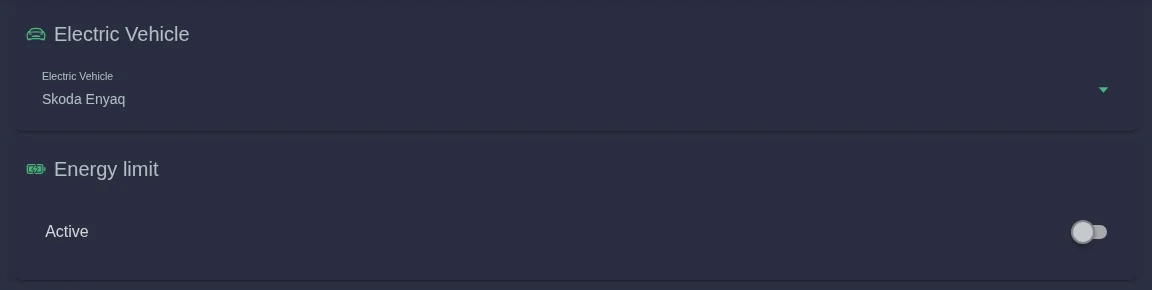
Click Energy limit in the menu.
Electric Vehicle shows the car that charges at this station. If you have stored several vehicles, select the right one here.
Switch on Active. Use the slider to set the amount of energy between 1 and 200 kWh. 20 kWh is suggested.
Click the tick. Once the amount is reached, the state shows Charging finished by energy limit.
To switch it off, turn Active off again and save. The car then charges without a limit.
The schedule
In the schedule you set things to happen automatically at certain times, differently from the base mode. There are two kinds of events.

Manual events
A manual event switches on a particular charging mode for a time window, for example Fast Charging every weekday from 6:00 to 7:30. Outside the time window your base mode applies again.
Click Add under Manual Events.
Select the Charging mode that should apply during this time.
Under Repeat, choose whether the event applies Daily, Weekly or Monthly, and set Start and End. Times go in quarter hours (:00, :15, :30, :45). For Weekly, also pick the weekdays under Rotation.
Click Accept. The event appears in the schedule and on the start page under Next Events.
Smart events
With a smart event you only state how much energy the car should get at least within a time window, for example 30 kWh between 22:00 and 6:00. Your SOLIO then charges within the time window at the cheapest times until that amount is reached. With a dynamic electricity tariff, these are the times with the lowest prices.
Create a smart event with Add under Smart Events. Enter Minimum energy to be charged [kWh] and choose the time window and repetition as for a manual event.
You change or delete existing events via Edit.
Phase switching
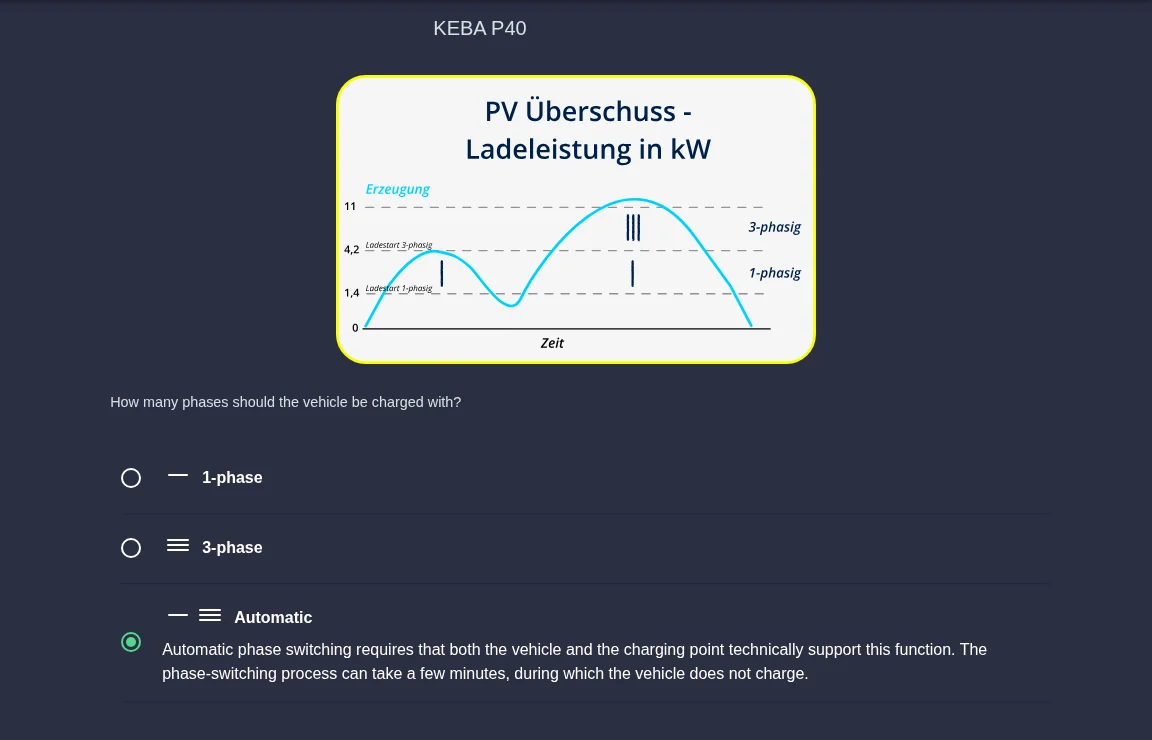
A car can charge on one phase or on three phases. On one phase, charging starts with little power; on three phases it is much faster, but needs more surplus before it starts at all.
| Option | Meaning |
|---|---|
| 1-phase | The car always charges on one phase. Good when the surplus is small. |
| 3-phase | The car always charges on three phases. Fastest. |
| Automatic | Your SOLIO switches by itself: to one phase when there is little sun, to three phases when there is plenty. |
You only see the Phase switching menu item if your charging station supports switching. For Automatic, both the car and the charging station must support the function. The switch takes a few minutes, during which the car does not charge.
Forecast and history
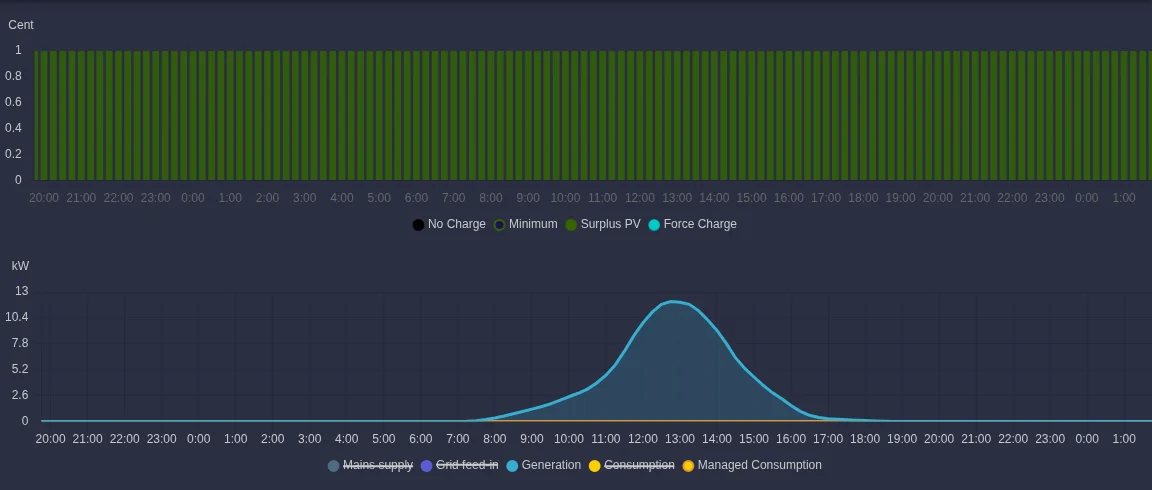
Forecast shows what your SOLIO is planning for the next hours. The upper chart shows for every quarter hour which mode charging is planned in (the legend lists No Charge, Minimum, Surplus PV and Force Charge). If a dynamic electricity tariff is set up, the height of the bars shows the electricity price. The lower chart shows the expected production; click the legend to show further lines.
History shows for a day or a week when and at what power your car charged and which mode was active. Use the arrows at the top to change the day.
Your vehicle (App Center Vehicles)
To plan correctly, your SOLIO knows the key data of your car. You find it under App Center Vehicles.
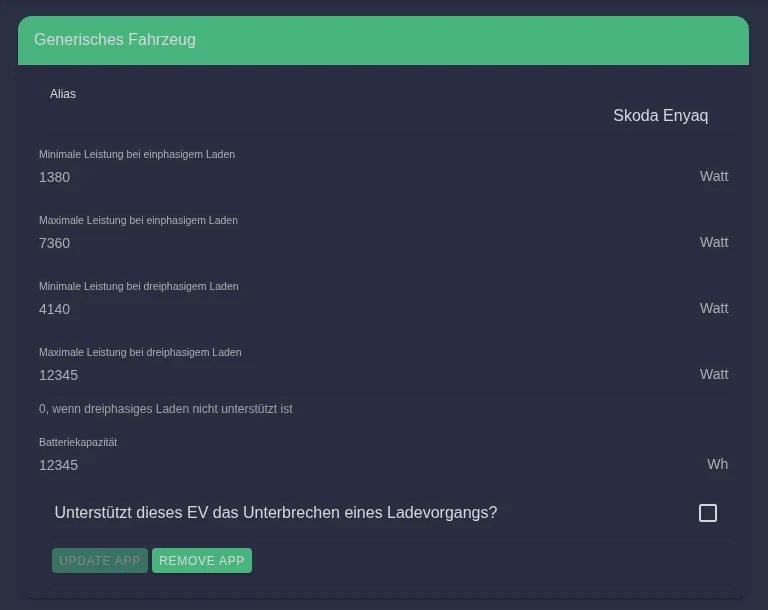
- Minimum and maximum power in single-phase and three-phase charging: The lowest and highest power your car can charge with. If your car cannot charge on three phases, the value is 0.
- Battery capacity: How much energy fits into your car's battery.
- Does this EV support interrupting a charging session? Automatic phase switching is only possible if this box is ticked.
Your installer usually sets up these values. Only change them if you know the figures from your car's data sheet, and save with Update app.
View with Manual, Automatic and Off
Depending on the charging station, the controls look slightly different. Instead of the four charging modes you then choose one of three modes under Settings:
| Mode | What happens |
|---|---|
| Manual | The car charges at the Maximum charging power you set with the slider, even if that takes grid electricity. If the car cannot take that much, less is charged automatically. |
| Automatic | Charging adapts to production and consumption, so the car charges with your surplus. |
| Off | The charging station does not charge. |
In Automatic mode there are two additional settings:
- Guarantee minimum loading: The car always charges with at least the set Minimum charging strength, so it does not stay empty overnight, for example.
- Prioritization: If you choose E-car, the car gets the surplus first. If you choose the storage option (labelled Memory), your battery storage is charged first.
In both modes you can switch on Limit maximum energy per charging process and set the Energy limit between 1 and 100 kWh.
Supported charging stations
Your SOLIO works with charging stations from many manufacturers. There are two kinds:
- Controlled: Your SOLIO shows the values and controls charging, for example with solar power.
- Display only: Your SOLIO shows power and state but does not control the charging station. The portal then says "This charging station cannot be controlled."
Your installer will tell you which variant is set up for you and whether your model is suitable.
KEBA KeContact P30 and P40
Your SOLIO fully controls the KeContact P30 and P40 wallboxes from KEBA. Alternatively, a KEBA charging station can be set up for display only.
Hardy Barth
Your SOLIO can control charging stations from Hardy Barth (eCharge) or just display them.
Mennekes
Your SOLIO controls the AMTRON Professional and AMTRON 4You from Mennekes. Alternatively, a Mennekes charging station can be set up for display only.
go-e Charger (display only)
For the go-e Charger, your SOLIO shows power and state. In this case the charging station is not controlled by the SOLIO.
IES Keywatt
Your SOLIO controls the Keywatt DC rapid charger from IES with one CCS connector.
Alpitronic Hypercharger
The Alpitronic Hypercharger is a DC rapid charging station for businesses and fleets. One unit has up to four charging points. Your SOLIO shows and controls each charging point individually. With several charging points, multi charging point management is worthwhile.
Alfen
Your SOLIO controls the Alfen charging stations Eve Single S-line, Eve Single Pro-line and Eve Double Pro-line.
Other charging stations
| Manufacturer | Kind |
|---|---|
| ABL | Display only |
| Heidelberg Energy Control | Display only |
| Wallboxes from the Volkswagen Group (Elli, Volkswagen, Škoda, Cupra, Audi) | Controlled |
| Webasto Next, Webasto Unite | Controlled (marked as beta in the App Center) |
| dezony IQ, EM2GO | Controlled (marked as beta in the App Center) |
Frequently asked questions
The sun is shining but my car is not charging. Why? A car needs a minimum power before it charges at all: about 1.4 kW on one phase and about 4.1 kW on three phases (6 amps per phase in each case). Your home is using electricity at the same time. Only when enough is left over does charging start in PV Surplus mode. When there is little sun, the 1-phase setting or the Minimum Charge with PV Surplus mode helps.
What does "Minimum switching time of the charging station active" mean? So that the car does not keep starting and stopping, the charging station keeps the current charging mode for a few minutes, even if the surplus changes. This avoids interrupted charging sessions.
The charging power differs slightly from what I set. Is that a fault? No. Every car implements the setpoint slightly differently, and the car itself limits the power, for example when its battery is full or cold.
The portal says "No connection to the charging station could be established." Check whether the charging station is switched on. If the message stays, please contact your installer.
I have several charging stations. What do I need to bear in mind? So that the charging stations do not draw too much power together, multi charging point management shares the available power according to an order of priority that you set yourself.