Dynamic electricity tariff
With a dynamic electricity tariff, the price changes over the course of the day, often every quarter of an hour. Your SOLIO knows the prices in advance and plans your battery accordingly: it saves stored electricity for expensive times and, if you wish, tops it up cheaply from the grid. All of this runs automatically.
The essentials
- Your SOLIO fetches your provider's electricity prices and uses them to create a schedule for your battery.
- It takes the expected production of your PV system and your usual consumption into account.
- The plan is recalculated continuously; you do not need to do anything.
- If you wish, your SOLIO actively charges the battery from the grid at cheap times.
- Your SOLIO needs a permanent internet connection to fetch the prices.
Why it pays off
The wholesale electricity price follows supply and demand: when there is plenty of wind or sun, electricity is cheap; in the evening it is often expensive. A dynamic tariff passes these fluctuations on to you. If you move your grid purchase to the cheap times, you pay less.
That is exactly what your SOLIO does for your battery. An example:
- At night and early in the morning electricity is cheap. Your home then uses the cheap grid electricity and the battery keeps its contents for later.
- In the evening electricity is expensive. Now the battery supplies your home.
- If little sun is forecast for the next day, your SOLIO can charge the battery from the grid during the cheapest hours, provided you allow it.
How your SOLIO works
Providers usually publish the prices for the next day in the afternoon. Your SOLIO combines these prices with its forecast of production and consumption and decides for every quarter hour what the battery should do. This is the state you see in the portal:
| State | What the battery does |
|---|---|
| Self-consumption optimization | Normal operation: your home is supplied from the PV system and the battery, and only the rest comes from the grid. |
| Discharge delayed | The battery holds back its electricity because it would be more valuable later. Your home now uses the cheap grid electricity. |
| Mains load | The battery charges from the grid at a cheap time. This only happens if you have switched on active charging from the grid. |
There are also a few less common states, for example Delay charge, Limit charge and Avoid feed-in limit. They come from grid-optimized charging, which is integrated into the dynamic electricity tariff.
What it looks like
You find the app in the menu under Cockpit → Storage system with its name, for example "Dynamic electricity tariff". At the top you see the Mode, the Current price in cents per kWh and the Status.
Below that, the Current timetable chart shows the past three hours and the plan for the period for which prices are already available:
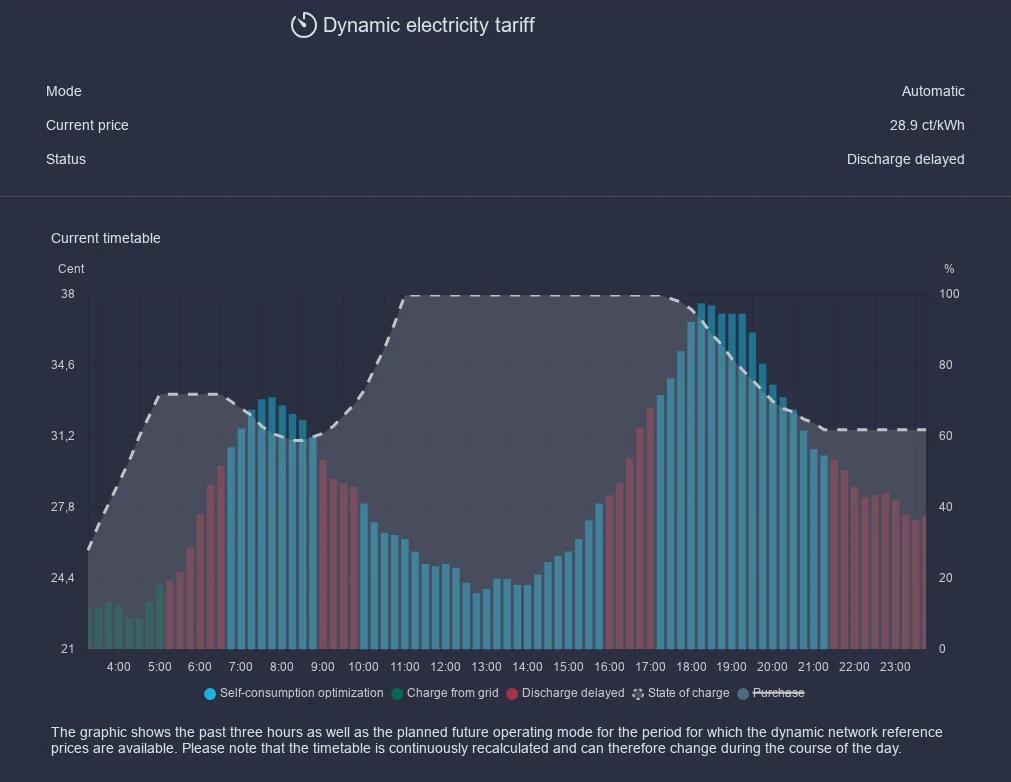
- The height of the bars is the electricity price of that quarter hour.
- The colour of the bars shows what the battery does during that time. The legend below the chart names the states.
- The line shows the battery's state of charge in percent.
The timetable is recalculated continuously and can therefore change during the day. Under History you can look back at which state your battery was in and when.
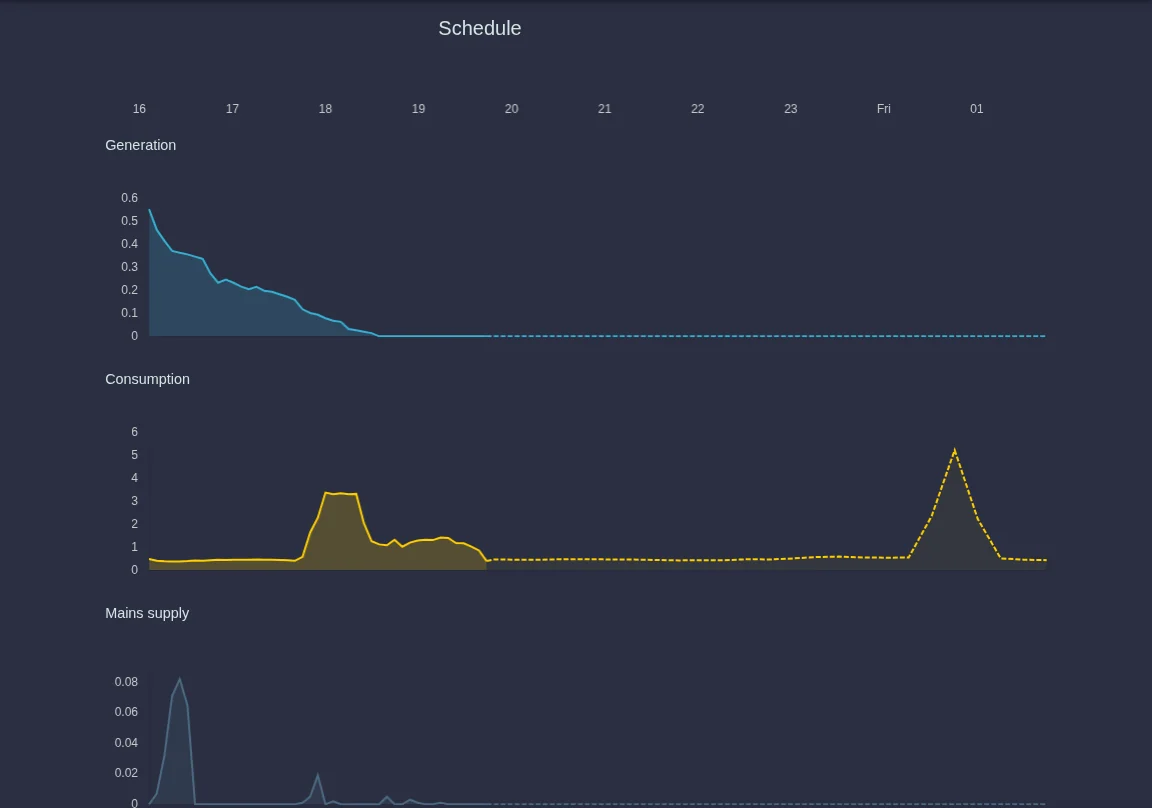
You also see the plan for the next hours in the schedule in the menu on the left. Solid lines are measured values, dashed lines the forecast:
When electricity prices are stored, the cockpit also shows today's electricity costs and savings in today's figures.
Using the app
Open the settings via Settings in the menu below the app.
Automatic switches the optimisation on. Off switches it off; your battery then works in normal self-consumption mode again.
The switch Activate active loading from the network allows your SOLIO to charge the battery from the grid at cheap times. Without it, your SOLIO only delays discharging.
Click the round button with the tick that appears at the bottom.
Actively charging the battery from the grid must be registered for your storage system. If in doubt, check with your installer. By saving, you confirm that you have checked this.
If you receive a subsidy under the German Renewable Energy Sources Act (EEG), your battery may only store electricity from renewable sources. Depending on your supply contract, grid electricity can also come from fossil fuels or nuclear power. The function is in beta testing and is being improved continuously.
Supported providers
You set up the app in the App Center and choose your provider there. Depending on the provider you need access details:
| Provider in the App Center | What you need |
|---|---|
| Tibber | A personal access token, which you create at Tibber under developer.tibber.com. |
| Awattar HOURLY | The zone: Germany or Austria. |
| ENTSO-E (wholesale price) | The bidding zone, for example Germany or Austria, and whether hourly or quarter-hourly prices apply. |
| EWS Schönau | A personal token, which you get by e-mail from api@ews-schoenau.de. |
| Stadtwerk Haßfurt | Your tariff type. |
| STROMDAO Corrently | Your postcode. |
| rabot.energy | A personal token from rabot.energy. |
| LUOX Energy | Your LUOX Energy login, entered directly in the app. |
| Groupe-E | No further details (Switzerland). |
| Swisspower | A token and your metering point number from Swisspower (Switzerland). |
| Octopus Go | Your standard price and the low price from midnight to 5:00 in cents/kWh. |
| Octopus Heat | Your high price (18:00 to 21:00), the low price (2:00 to 6:00 and 12:00 to 16:00) and the standard price. |
ENTSO-E supplies the pure wholesale price. Many dynamic tariffs are based on it, but grid fees, taxes and levies are not included. For Octopus Go and Octopus Heat you enter the prices yourself. If your provider changes them, please update them.
Time-variable grid fees and EEG 2025
- Time-variable ancillary costs: If you have a fixed electricity tariff but time-variable grid fees under Section 14a of the German Energy Industry Act (module 3), enter your fixed price without grid fees and your grid operator's time windows. Your SOLIO then plans with the resulting price.
- EEG 2025: If your system is affected by the EEG 2025 rules, this app reduces your feed-in as far as possible while wholesale prices are negative. Any surplus that is still left over is fed in as usual and is not lost. The dynamic electricity tariff then also shows the EEG 2025 Forecast with the expected feed-in and remuneration.
Frequently asked questions
Why does the battery not charge from the grid at the very lowest price? Your SOLIO only charges from the grid when it is likely to pay off. If enough sun is expected the next day, the PV system will fill the battery anyway. In addition, some energy is always lost when charging and discharging, so small price differences are not worth it.
The behaviour sometimes seems illogical. What could be the reason? The plan is based on forecasts of weather and consumption. If the weather or your consumption differs, your SOLIO adjusts the plan continuously. After setup, a restart or an update it also needs some time until the forecasts fit well again. An electric car that charges without being controlled by the SOLIO, or production that is not fully measured, also upsets the planning.
Does the app work without internet? No. The prices come via the internet. If the connection is missing for a longer time, your SOLIO can no longer plan according to prices.
What about grid-optimized charging? Grid-optimized charging is already included in the dynamic electricity tariff. Your previous settings remain in effect.
Can I change provider? Yes. Set up the app for your new provider in the App Center. If in doubt, ask your installer.