Portal & app at a glance
With the SOLIO portal and the app you can see what your system is doing at any time: in the browser on your computer, on a tablet or on your smartphone when you are out and about.
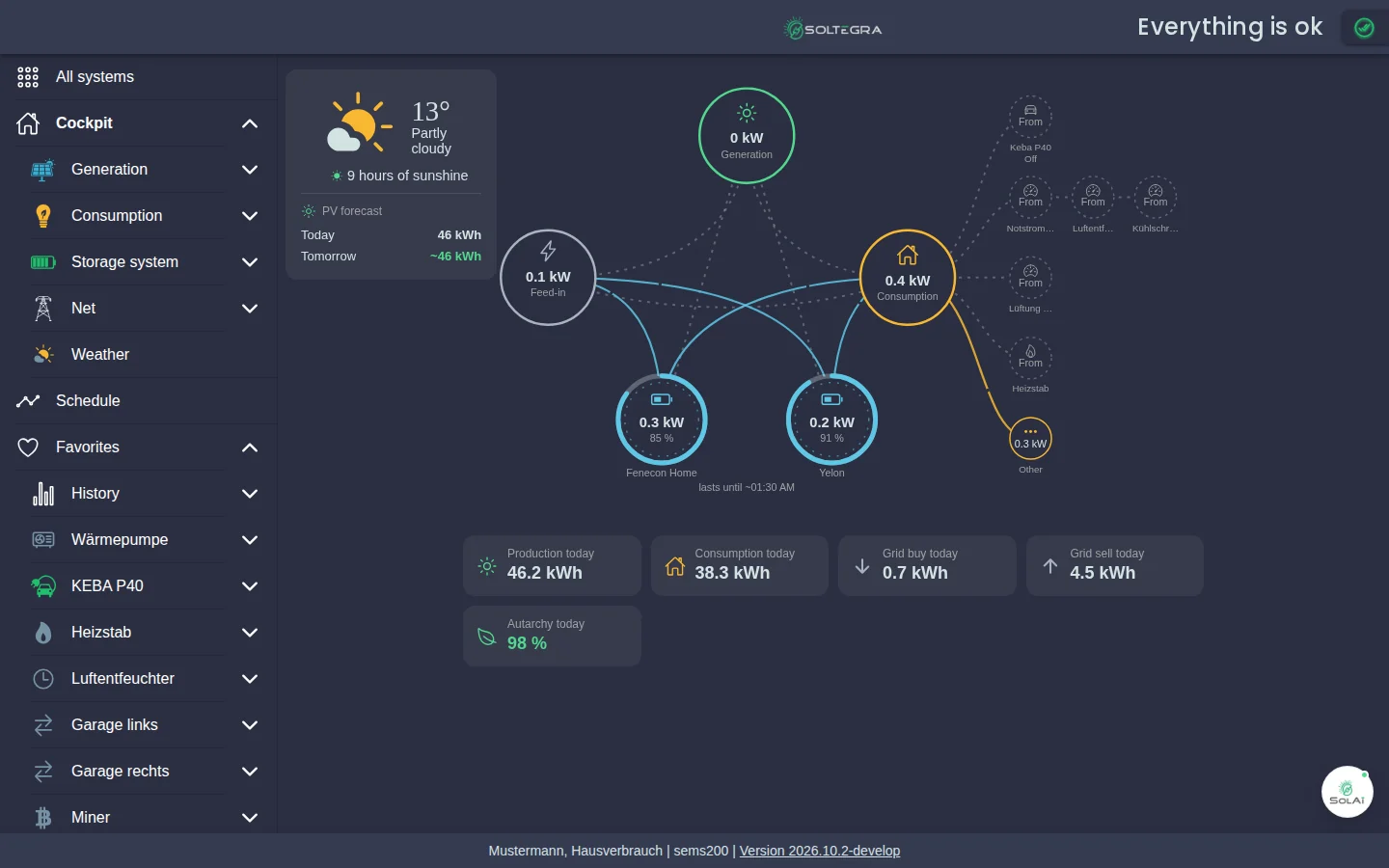
- Switch to another system here if your account has more than one.
- Your start page. Below it you open Generation, Consumption, Storage system, Grid and Weather in detail.
- What your SOLIO expects and plans for the next few hours.
- Your devices and favourite pages, such as heat pump, wallbox or history. Use the heart symbol to add more.
- The weather at your location and how much electricity your system is expected to generate today and tomorrow.
- Where your electricity is coming from right now and where it is going: generation at the top, grid on the left, consumption on the right, storage at the bottom.
- Is your battery charging or discharging? Plus its state of charge in per cent and how long the stored energy will last.
- Individual consumers such as a wallbox, heating rod or ventilation. "Other" is everything that is not measured separately.
- Your day since midnight: generation, consumption, grid purchase, feed-in and self-sufficiency.
- "Everything is ok" means all devices are working. Click the tick to see each device.
- Your energy assistant with suggestions on how to use even more of your own electricity.
What you will find here
Sign in, install the app, choose your system, switch on the new design and access without internet.
Energy flow, today's figures, weather, system status, navigation and schedule.
Understand production, consumption, storage, grid, weather, self-sufficiency and self-consumption.
Compare periods and download your data as an Excel file.
System profile, notifications, network, updates and restart.
Regular summaries of your system by e-mail.
Passwords, language and light or dark design.
Extra functions for heating, electric cars, electricity tariffs and more.
Three questions, three answers
What does my SOLIO actually do? Your SOLIO is the energy management system of your installation. It constantly measures how much electricity is produced, consumed, stored and exchanged with the grid, and controls your devices so that you use as much of your own electricity as possible.
Do I have to set anything up in the portal? No. Your installer has set everything up and your system runs automatically. The portal shows you what is happening and lets you step in when you want to, for example when charging your electric car.
What happens if the internet connection fails? Your system keeps working as normal. Only the display in the portal is not up to date for that time. At home you can still access your SOLIO directly.