Combined heat and power plant (CHP)
A combined heat and power plant (CHP) produces electricity and heat at the same time, regardless of sunshine and time of day. Your SOLIO starts it automatically when your storage system is running low and stops it again as soon as the storage system is sufficiently charged.
The essentials
- Your SOLIO gives the CHP the signal to start or stop via a relay contact.
- In Automatic mode, the state of charge of your storage system decides: below the Lower threshold value the CHP starts, from the Upper threshold value it stops.
- With On and Off you can switch the CHP manually at any time.
- The History shows how long the CHP has been running.
How automatic mode works
The two thresholds form a range. As long as the state of charge of your storage system lies in between, your SOLIO changes nothing. This way the CHP does not keep starting and stopping.
An example: lower threshold 20 %, upper threshold 70 %.
- In the evening your storage system discharges. When the state of charge drops to 20 %, your SOLIO starts the CHP.
- The CHP's electricity supplies your home and recharges the storage system. The heat goes into your heating system or your heat storage tank.
- When the storage system reaches 70 %, your SOLIO stops the CHP again.
Your SOLIO only gives the CHP the release. Whether it actually runs is still decided by the CHP's own control, for example when the heat storage tank is already full.
What it looks like
You find your CHP in the menu under Cockpit → Consumption, with the name your installer gave it. The heart icon adds it to your Favorites.
- Mode: On, Automatic or Off.
- Condition: Active when your SOLIO is currently releasing the CHP, otherwise Inactive.
- Bar: in Automatic mode, a bar shows the range between the two thresholds and a marker for the current state of charge of your storage system.
Setting the mode and thresholds
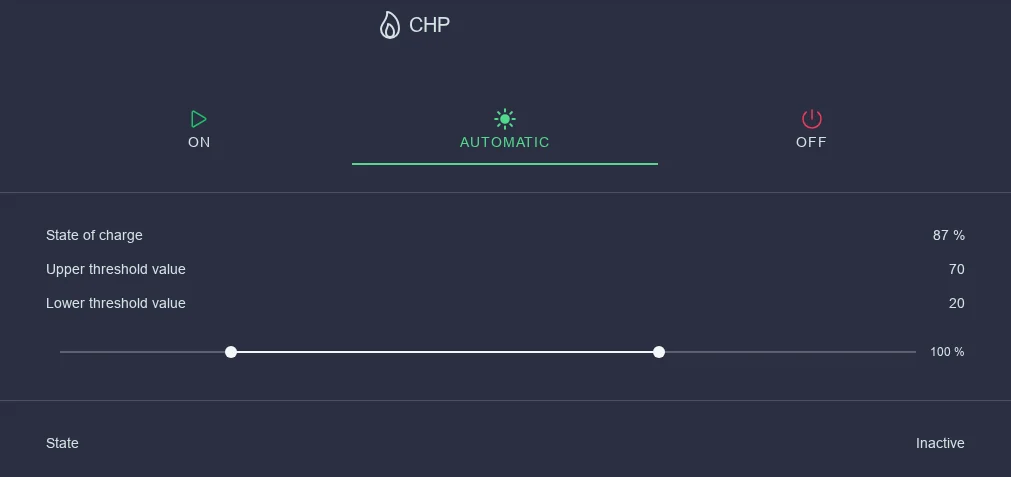
In the menu, click Settings below your CHP.
Select On, Automatic or Off.
In Automatic mode, drag the two points on the slider: on the left the Lower threshold value, on the right the Upper threshold value.
Click the round button with the tick that appears at the bottom.
| Mode | What happens |
|---|---|
| On | The CHP is released continuously, for example for a test run after maintenance or when heat demand is high. |
| Automatic | Your SOLIO starts and stops the CHP according to the state of charge of your storage system. |
| Off | The CHP stays off, for example during maintenance or in summer when no heat is needed. |
If the two thresholds are close together, the CHP starts and stops more often. A larger gap means fewer starts and longer runs at a time.
The history
Under History you see when the CHP was released, and the Duty cycle in the selected period, that is, how long it ran in total.
What you need
Your installer sets this up:
- a CHP that can be started and stopped via a potential-free contact
- a SOLIO relay board with one free relay contact (accessory, not included in the scope of delivery)
- the "Combined heat and power plant (CHP)" app in the App Center
Only a qualified electrician may connect the CHP. The manufacturer's instructions for the CHP and the applicable electrical regulations must be followed.
Frequently asked questions
The CHP is not running although the condition shows "Active". Your SOLIO has released the CHP, but the CHP's own control is not starting it at the moment, for example because the heat storage tank is full or there is a fault. Check the display on the CHP or contact your installer.
The CHP does not start although the storage system is almost empty. Check whether the mode is set to Automatic and whether the state of charge really is below the lower threshold. If it is still in between, your SOLIO waits.
Can the CHP also be controlled by grid purchase or electricity price? This app switches the CHP according to the state of charge of your storage system. For other conditions, ask your installer about threshold control.