Heating element
A heating element in your hot water or buffer tank turns solar power that you would otherwise feed into the grid for very little money into hot water. Your SOLIO switches it on automatically whenever there is enough surplus.
The essentials
- In automatic mode, the heating element heats with solar power that your home does not need at the moment.
- You can switch at any time: automatically with surplus, heat right away, or off.
- To make sure the water gets hot on dull days too, set a minimum heating time or a schedule.
- The history shows you when and at what power the heating element was running.
Which heating element do you have?
Your SOLIO works with two kinds of heating element. They are operated slightly differently.
A heating element with its own continuous control, which your SOLIO talks to over the network.
A simple three-phase heating element that your SOLIO switches in up to three levels via relays.
How to tell them apart: if the page of your heating element shows Current temperature, Heating output and Mode with charts, you have a my-PV or ASKOMA heating element. If it shows an Active level, it is a heating element with power levels. The Fronius Ohmpilot has its own page.
Finding your heating element
- In the menu: under Cockpit → Consumption you find your heating element with the name your installer gave it, for example "Heating element". The arrow next to it opens sub-items such as History, Schedule and Settings.
- In the energy flow: in the cockpit the heating element appears as a small circle to the right of consumption, showing its current power or "Off".
- As a favourite: the heart icon at the top of the page adds the heating element to your Favorites.
my-PV and ASKOMA
What it looks like
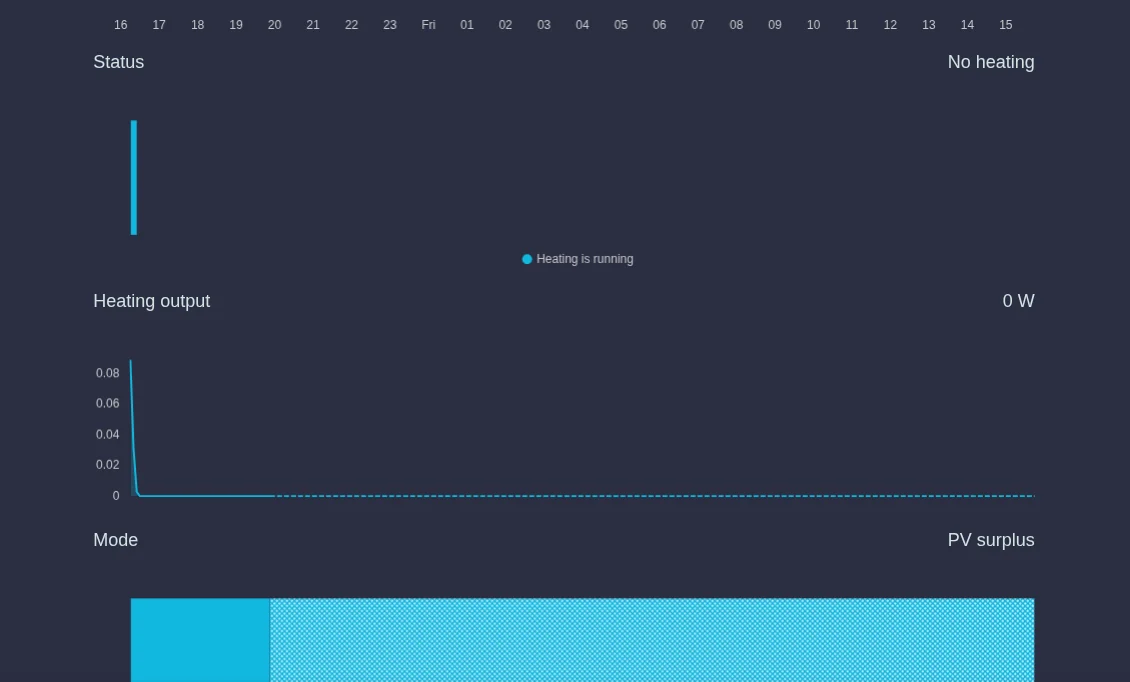
| Display | Meaning |
|---|---|
| Current temperature | The current water temperature measured by the heating element. |
| Status | Heating is running, No heating, Target temperature reached, Control not allowed (the device does not accept commands at the moment) or Error. |
| Heating output | The power the heating element is heating with right now. |
| Mode | The heating mode that currently applies, for example PV surplus. |
Below Status, Heating output and Mode, a chart shows the course over the next 24 hours, so you can see at a glance when your SOLIO expects to heat. Depending on your system, you may see only the current values instead of the charts.
Choosing the heating mode

| Heating mode | What happens |
|---|---|
| Fast heat | The heating element heats at full power up to the maximum temperature set on the device, even if there is no surplus at the moment. After at most 10 hours in a row it takes a one-hour break. |
| PV surplus | Your SOLIO switches the heating element on automatically and adapts its power to the available solar surplus. |
| No heating | Your SOLIO does not switch the heating element on. |
In the menu, click Settings below your heating element.
Select Fast heat, PV surplus or No heating.
Click the round button with the tick that appears at the bottom. The new mode applies straight away.
Setting heating times with the schedule
With the Schedule you set a different heating mode for certain times. An example: every morning from 5:00 to 6:00 Fast heat, so that the water for your shower is guaranteed to be hot. Outside these times, the heating mode from the settings applies again.
In the menu, click Schedule below your heating element and then Add.
Under Heating mode, choose what should apply during this period.
Under Repeat, choose Daily, Weekly (with weekdays) or Monthly. Then enter Start and End. Times can be set in quarter hours, for example 5:00, 5:15 or 5:30.
Click Accept. The entry appears in the schedule. With Edit you can change or delete it later.
Display only
Some my-PV and ASKOMA heating elements are connected for display only (in the App Center "my-PV read only" or "ASKOMA - read only"). Your SOLIO then shows the values but does not control the heating element, and there is no schedule or heating mode. You change the settings directly on the device or in the manufacturer's app, for example the my-PV app.
Heating element with power levels
A three-phase heating element has three heating coils, one per phase. Your SOLIO switches them on one by one and so achieves three power levels, called Level in the interface. For a 6 kW heating element it looks like this:
| Level | Power (example: 6 kW heating element) |
|---|---|
| Level 0 | Heating element off |
| Level 1 | 2 kW (one heating coil) |
| Level 2 | 4 kW (two heating coils) |
| Level 3 | 6 kW (all three heating coils) |
For heating elements with a different power, the levels are divided accordingly.
What it looks like
The page of your heating element shows:
- Mode: On, Automatic or Off.
- Condition: what the heating element is doing right now (see the table below).
- Active level: the level it is currently heating with.
- Heat output: the measured power, if your heating element has its own meter.
| Condition | Meaning |
|---|---|
| Inactive | The heating element is not heating at the moment. |
| Active | The heating element is heating; in Automatic mode with solar surplus. |
| Active (minimum term) | The heating element is heating so that the minimum heating time you set is reached. |
| Active (additional energy) | The heating element is heating so that the minimum heating energy you set is reached. |
| Finished | The minimum heating energy you set has been reached. |
| Unattainable | The minimum heating energy can no longer be reached by the end time. The heating element still heats as much as possible. |
| Calibration | Your SOLIO briefly measures how much power the individual levels actually have. |
Choosing the operating mode
| Mode | What happens |
|---|---|
| On | The heating element heats continuously at the selected Level. |
| Automatic | Your SOLIO switches the levels on and off depending on the solar surplus. Your storage system is not discharged for this. |
| Off | The heating element stays off. |
In the menu, click Settings below your heating element.
Select On, Automatic or Off. For On, also choose the Level.
Click the round button with the tick that appears at the bottom.
Hot water even without sunshine
In Automatic mode, you can use Guarantee mode to make sure that the heating element heats by a certain time in any case, even when there is no surplus:
- Minimum duration: by the End time, the heating element runs for at least the Minimum term you set (up to 10 hours) at the selected Level.
- Minimum energy: by the End time, the heating element heats at least the amount of energy you set (Minimum energy limit in kWh). This requires your heating element to have its own meter. If the amount can no longer be reached in the remaining time, the message "The energy limit cannot be reached in time" appears.
- None: the heating element only heats with surplus.
An example: you set a minimum term of 1 hour by 17:00. It is cloudy all day and there is no surplus. To make up the hour by 17:00, your SOLIO switches the heating element on at 16:00.
The minimum term is a lower limit, not an upper limit. If there is enough surplus, the heating element heats for longer, until the thermostat on the heating element switches off.
The history
Under History you can see when your heating element was heating. Choose the period at the top and use the arrows to move back and forth.
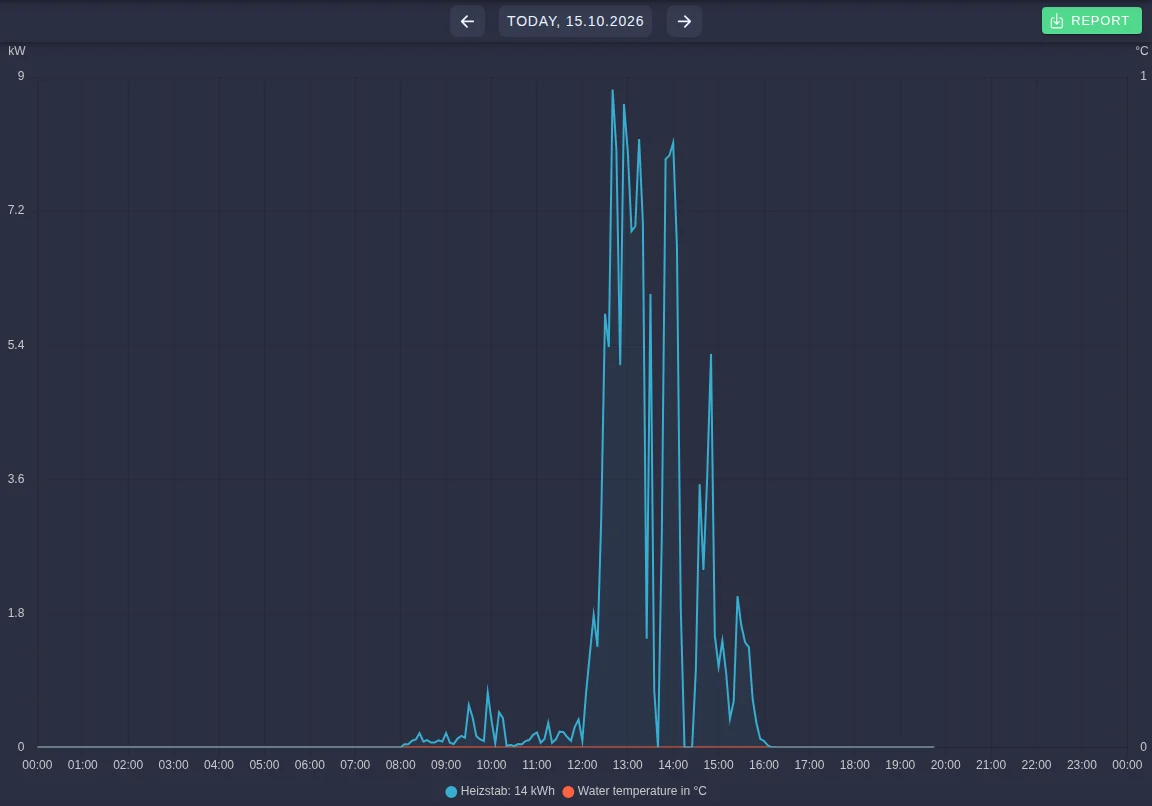
- my-PV and ASKOMA: the chart shows the heating output and the temperatures. Report downloads the values as an Excel file.
- Heating element with power levels: you see the Duty cycle per level and, if the heating element is measured, its Consumption.
You also find the heating element in the Consumption area under History, together with your other consumers.
What you need
Your installer sets up the heating element and activates the matching app in the App Center.
- my-PV or ASKOMA: a compatible heating element in the same network as your SOLIO. In the App Center the apps are called "my-PV" and "ASKOMA", and for display only "my-PV read only" and "ASKOMA - read only".
- Heating element with power levels: a three-phase heating element with neutral conductor and a SOLIO relay board with three free relay contacts. The relay board is not included in the scope of delivery. The app is called "Heating element".
The relay board switches up to 10 A per contact, which is about 2.3 kW per phase. Stronger heating elements need additional contactors. Your installer checks this.
Frequently asked questions
Why is the heating element not heating although the sun is shining? As long as your home and your storage system take up the solar power, there is no surplus. The heating element usually only starts when the storage system is full or when more power is generated than it can take. The heating element also switches off as soon as the water has reached the temperature set on the device.
The condition shows "Active" but the heat output is 0. Is something broken? Usually not. If the thermostat on the heating element has switched off because the water is hot enough, the heating element draws no power, even though your SOLIO has released it.
How much electricity has my heating element with power levels used? If the heating element is measured, you see the consumption directly in the history. Otherwise you can estimate it from the duty cycle: duty cycle times the power of the level. An example for a 6 kW heating element: 7.5 hours at Level 1 (2 kW) come to about 15 kWh. If the thermostat switched off in between, the actual consumption was lower.
Why is the heating element switched in levels and not continuously? A simple three-phase heating element is inexpensive and robust. In practice the three levels are perfectly adequate, because your SOLIO keeps choosing the right level. If you prefer continuous control, use a heating element with its own control such as my-PV or ASKOMA.