Bitcoin Mining with Solar Power
Your SOLIO runs a Bitcoin miner preferably when your system is producing more power than you need at that moment. Instead of feeding the surplus into the grid, the miner uses it. You decide how full your battery must be at least and how hot the miner may get.
At a glance
- Three modes: Automatic, On and Off.
- In Automatic mode the miner runs when there is enough surplus or when your SOLIO's plan provides for it. If there is no surplus, it pauses.
- Mindest-SoC für Mining (minimum state of charge for mining): if your battery's state of charge is below this value, the miner pauses. Your battery comes first.
- Maximale Chip-Temperatur (maximum chip temperature): if the miner gets too hot, it pauses.
- Your installer connects the miner.
Some labels on the miner pages are currently only shown in German, even in the English interface. This page gives the German label together with its meaning.
What it looks like
You will find the miner in the menu on the left under Cockpit → Consumption. It has a Bitcoin icon and, in our example, the name "Miner".

| Display | Meaning |
|---|---|
| Condition | Mining when the miner is working, otherwise Paused. |
| State of charge | How full your battery is right now. |
| Miner-Leistung | How much power the miner is drawing right now. |
| Chip-Temperatur (max.) | The temperature of the hottest chip in the miner. |
Setting the mode and limits
Expand the miner in the menu and open Settings.
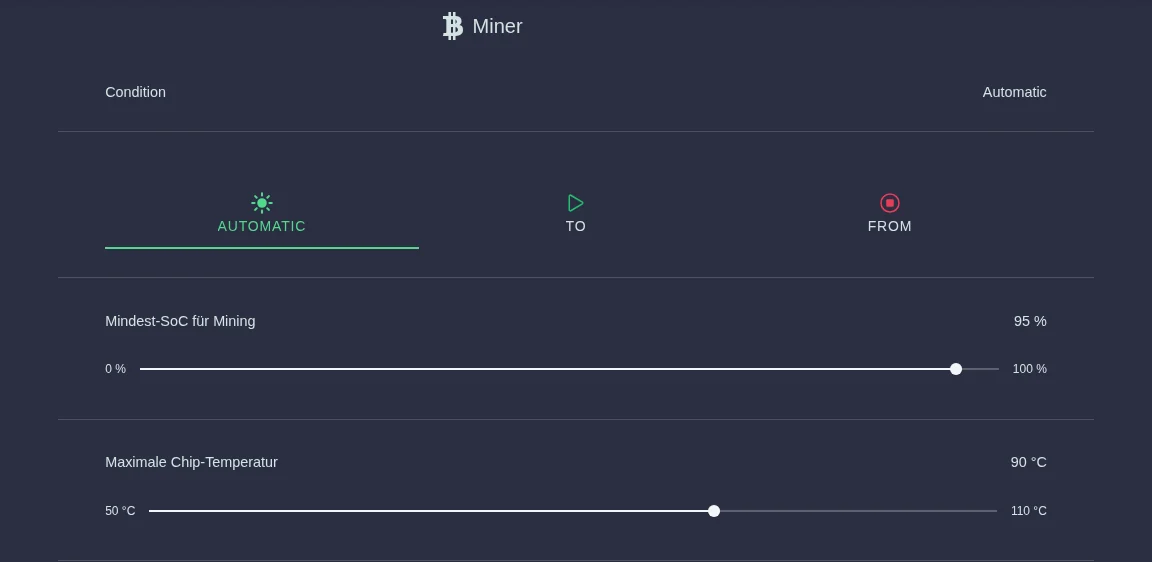
| Mode | What happens |
|---|---|
| Automatic | Your SOLIO decides when the miner runs (see below). The limits for state of charge and temperature apply. |
| On | The miner runs permanently, even without surplus. The power then comes from your battery or the grid. |
| Off | The miner stays paused. |
Use the two sliders to set the limits:
- Mindest-SoC für Mining (0 to 100 %): below this state of charge of your battery, the miner pauses. At 95 %, for example, it only runs once your battery is almost full. A lower value lets the miner work even when the battery is less full.
- Maximale Chip-Temperatur (50 to 110 °C): if a chip gets hotter than this, the miner pauses. It is best to leave this value as your installer set it.
Expand the miner in the menu and click Settings.
Click Automatic, On or Off and move the sliders to the values you want.
Click the round button with the tick at the bottom of the page (bottom right on a smartphone). Only then do the new settings take effect.
In On mode the miner keeps running even if your battery is almost empty or there is no solar power. The minimum state of charge and the chip temperature limit are only observed in Automatic mode. So only choose On deliberately and for a short time.
How automatic mode decides
In Automatic mode your SOLIO continuously checks three things:
- Protection first: if the miner is too hot or the state of charge is below Mindest-SoC für Mining, it pauses, whatever else applies.
- The plan: your SOLIO plans ahead using its forecast for generation and consumption to work out when mining makes sense. Depending on the setup, the miner may for example run from the battery at night if the battery is expected to be full again the next day anyway.
- Surplus: otherwise the miner runs as soon as you feed more power into the grid than it needs. It does not take any power from your battery while doing so. If the surplus is no longer enough, it pauses. So that not every cloud stops it, your SOLIO switches with a short delay.
Under Geplanter Mining-Verlauf (planned mining schedule), the settings show this plan as a chart: when the miner is due to run, the expected Generation and, as a dashed line, the expected State of charge of your battery.
Miners with Braiins OS
For miners running the Braiins OS operating system, the page in the portal looks slightly different. Here you decide yourself when the miner runs:
- Base mode: under the question "Which mode should apply to the miner?" you choose On or Off. This mode applies whenever no schedule entry is active.
- Schedule: with Add task you create time slots with Start, End, Repeat (daily, weekly or monthly) and the Mode you want. Times are chosen in quarter-hour steps.
The overview shows the miner's current power and the mode that currently applies, each with its history. If you have several such miners, the menu groups them under Bitcoin Miner.
Frequently asked questions
Why is my miner paused even though the sun is shining? Usually one of these reasons takes priority: the state of charge is still below Mindest-SoC für Mining, so your battery is charged first. Or your surplus is smaller than the miner's power. Less often, the miner is too warm. The overview shows the state of charge and chip temperature at a glance.
Does the miner keep running if the internet fails? The control runs directly on your SOLIO in your home network, so it keeps making decisions without an internet connection.
Who is allowed to change the settings? You need the Owner role.
Which miners are supported? Your installer knows which devices can be connected. They connect the miner to your SOLIO and enter the miner's power so that automatic mode calculates correctly.